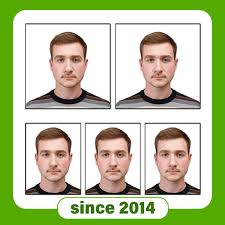
A Passport Photo Maker is a useful photo editing tool that allows users to create passport-size and ID-size photographs directly from a smartphone or computer. Instead of visiting a photo studio for every small requirement, users can prepare a properly sized photo for documents, applications, resumes, ID cards, visas, and other official purposes.
With the increasing popularity of online document services, digital applications, visa applications, professional photography, photo editing software, and remote application systems, passport photo maker tools have become convenient for students, employees, travelers, freelancers, and business users.
What Is a Passport Photo Maker?
A Passport Photo Maker is an application or digital tool designed to convert a regular portrait into a properly formatted passport or ID photograph.
The software can usually help users:
- Select a suitable photograph
- Crop the image
- Resize the photo
- Adjust brightness
- Improve contrast
- Change or clean the background
- Create multiple copies
- Arrange photos on a printable page
- Export the final image
The exact features depend on the application.
A major advantage is convenience. Users can prepare a photo at home without requiring advanced photo editing skills.
Why Use a Passport Photo Maker?
Traditional passport photography usually requires visiting a professional photographer. While professional photography is still the better choice when a government authority requires strict specifications, a passport photo maker can be useful for everyday document requirements.
For example, students may need photographs for school forms, job applications, identification cards, or online profiles.
Professionals may need photos for:
- CVs
- Employee records
- Company documents
- Membership cards
- Professional profiles
Travelers may also need correctly formatted photographs for different visa or immigration applications.
Main Features of Passport Photo Maker
Photo Cropping
The cropping feature allows users to remove unnecessary parts of an image and focus on the face and upper body.
A good crop should maintain the correct composition rather than simply zooming into the face.
Photo Resizing
Passport and ID photographs often require specific dimensions.
A passport photo maker can resize an image according to the selected format.
Users should always check the exact requirements of the organization requesting the photograph because dimensions can differ between countries and document types.
Background Editing
Many passport photographs require a plain background.
Some photo maker applications provide background removal or replacement features that can help create a cleaner result.
However, users should avoid artificial editing when an authority requires a naturally captured photograph or has strict rules regarding background processing.
Brightness Adjustment
Lighting can strongly affect the quality of an identification photograph.
Brightness controls can help correct an image that is slightly too dark or too bright.
Contrast Adjustment
Contrast controls can improve visibility and make the photograph appear clearer.
The adjustment should remain natural because excessive editing can change the appearance of the person.
Multiple Photo Layout
Some tools allow users to arrange several passport-size photographs on a single printable page.
This can be useful when multiple copies are required.
High-Quality Export
A good passport photo maker should preserve image quality while resizing the photograph.
Low-resolution images can become blurry when printed.
Passport Photo Maker for Android
Android smartphones have made photo editing extremely accessible.
A passport photo maker for Android can allow users to create document photographs directly from their phone.
The basic workflow is usually:
- Select a photo.
- Crop the image.
- Choose the required photo size.
- Adjust the background if necessary.
- Make basic lighting corrections.
- Preview the result.
- Save the final image.
The process is generally simple enough for beginners.
How to Take a Good Passport Photo
The quality of the original photograph is more important than the editing application.
Before taking a picture, choose a clean and uncluttered background.
Use sufficient lighting and avoid strong shadows across the face.
Keep the camera at approximately eye level.
The person should normally look directly toward the camera with a neutral expression unless the specific organization has different requirements.
Avoid extreme filters, beauty effects, or face-changing features.
Lighting Tips
Good lighting can make a significant difference.
Try to use soft, even lighting across the face.
Avoid:
- Strong shadows
- Flash reflections
- Extremely bright backgrounds
- Dark rooms
- Colored lighting
- Direct sunlight creating harsh facial shadows
Natural daylight can work well when used correctly.
For indoor photography, placing the subject near a bright window can provide balanced illumination.
Background Requirements
Many official identification photographs require a plain background.
White or light-colored backgrounds are commonly used, but requirements vary depending on the document.
A passport photo maker may offer automatic background removal.
However, users should carefully inspect the result.
Hair edges, ears, glasses, and shoulders can sometimes be incorrectly removed by automatic background tools.
For official applications, the final image should comply with the exact requirements of the relevant authority.
Passport Photo Size
There is no single universal passport photo size for every country.
Different governments, embassies, visa systems, and organizations can have different specifications.
Before creating the final image, check:
- Required width
- Required height
- Pixel dimensions
- Print dimensions
- Background color
- Face positioning
- Head size
- Image format
- File size
- Digital or printed submission requirements
A passport photo maker can help with these adjustments, but the user must select the correct specification.
Passport Photo Maker for Visa Applications
Visa applications often have specific photograph requirements.
Depending on the destination, applicants may need a particular:
- Image size
- Background
- Face position
- Resolution
- File format
- Maximum file size
Some visa systems accept digital photographs, while others require printed photographs.
For this reason, users should always check the current requirements of the relevant embassy, immigration department, or visa application system before submitting an edited photograph.
Passport Photo Maker for Job Applications
Not every job application requires a passport-style photograph, but some employers or professional organizations may request one.
A passport photo maker can help create a clean professional photograph with:
- Proper framing
- Neutral background
- Balanced lighting
- Suitable dimensions
For a CV or professional profile, however, requirements may be less strict than those for government identification.
Passport Photo Maker for Students
Students may need photographs for:
- School admission
- University applications
- Student cards
- Examination forms
- Scholarships
- Library cards
- Internship applications
A mobile passport photo maker can make it easier to prepare these photographs quickly.
Benefits of Passport Photo Maker Apps
Saves Time
Users can prepare a photo without visiting a photography studio for every requirement.
Convenient
The process can be completed using a smartphone.
Easy for Beginners
Most tools provide simple cropping, resizing, and adjustment controls.
Multiple Copies
Users can create layouts containing several photographs.
Cost Effective
For simple personal requirements, creating a photograph at home can reduce photography and printing costs.
Quick Editing
Basic corrections can usually be completed within minutes.
Professional Photo Editing vs Passport Photo Maker
A professional photo editor provides much more advanced controls, including:
- Layer editing
- Color correction
- Retouching
- Masking
- Advanced background editing
- RAW processing
A passport photo maker focuses on a specific purpose.
For someone who only needs a properly formatted identification photograph, a specialized application can be easier to use.
Is a Passport Photo Maker Safe?
Safety depends on the application.
Users should pay attention to privacy because passport-style photographs can be considered sensitive personal images.
Before using an online or mobile photo editing service, consider:
- Where images are uploaded
- Whether photographs are stored
- Whether images are automatically deleted
- What permissions the application requests
- Whether the service shares information with third parties
Avoid uploading important identity documents together with your photograph unless it is necessary.
Privacy and Personal Photos
A passport photograph can be used as part of identity verification, so privacy should be taken seriously.
If an application offers cloud-based editing, understand whether the photograph is uploaded to remote servers.
For highly sensitive documents, offline editing may provide additional privacy.
Users should also avoid sharing passport photographs publicly on social media unless there is a specific reason.
Common Passport Photo Mistakes
Incorrect Size
Using the wrong dimensions is one of the most common problems.
Poor Lighting
Dark or uneven photographs may be rejected.
Incorrect Background
A background that doesn’t meet the required specification can cause problems.
Excessive Editing
Strong beauty filters, skin smoothing, face reshaping, and other effects can make the image unsuitable for official identification.
Blurry Image
Low-quality photographs may not meet digital or printing requirements.
Wrong Face Position
The face should generally be positioned according to the specific photo guidelines.
Accessories
Certain applications may have restrictions regarding hats, sunglasses, or other accessories.
Always check the relevant requirements before submitting the image.
How to Make a Passport Photo at Home
Creating a passport-style photo at home can be straightforward.
Step 1: Prepare the Background
Choose a plain background with good lighting.
Step 2: Position the Camera
Place the camera at approximately eye level.
Step 3: Take Several Photos
Taking multiple photographs gives you more options.
Step 4: Choose the Best Image
Select the clearest photograph with balanced lighting.
Step 5: Open the Passport Photo Maker
Import the selected photograph.
Step 6: Crop and Resize
Choose the appropriate dimensions required for your application.
Step 7: Adjust the Background
If necessary, use the background tools while maintaining a natural appearance.
Step 8: Check the Final Result
Make sure the face, shoulders, background, and image quality meet the required specifications.
Step 9: Export
Save the final photograph in the required file format and resolution.
Can AI Make Passport Photos?
AI-powered photo editing tools can automatically detect faces, remove backgrounds, adjust lighting, and resize images.
These features can make the process faster.
However, AI editing should be used carefully for official photographs.
An identification photo needs to represent the person accurately. Excessive AI enhancement or face modification can make an image unsuitable for identity verification.
The best approach is to use AI for basic technical adjustments rather than changing facial features.
Passport Photo Maker and Online Photo Printing
Some users may want a digital file and others may need printed copies.
If printing the photograph, pay attention to:
- Paper quality
- Printer resolution
- Correct dimensions
- Image sharpness
- Color accuracy
- Proper spacing between photographs
A passport photo maker that supports multiple-photo layouts can make printing several copies easier.
Digital Passport Photo
Digital passport photographs are increasingly common for online applications.
A digital image may require a specific:
- Pixel size
- File format
- File size
- Background
- Resolution
Don’t assume that a photograph suitable for printing will automatically meet digital application requirements.
Always check the exact instructions provided by the relevant authority.
How to Get Better Results
For a professional-looking result, follow these tips:
- Use a high-resolution camera.
- Keep the lens clean.
- Use even lighting.
- Maintain a neutral background.
- Keep the camera straight.
- Avoid extreme filters.
- Don’t over-edit skin.
- Check the required dimensions.
- Review the final image at full resolution.
- Keep an original copy of the photograph.
Frequently Asked Questions
What is a Passport Photo Maker?
It is a photo editing tool designed to crop, resize, adjust, and format photographs for passport, visa, ID, and other document requirements.
Can I make a passport photo with my phone?
Yes. A smartphone camera combined with a suitable photo editing application can be used to prepare a passport-style photograph.
What background should I use?
The correct background depends on the specific document requirements. Many official applications require a plain background.
Can I use a selfie?
A selfie may not be ideal because camera angle, lighting, and facial positioning can be incorrect. A properly positioned camera generally produces a better result.
Can I use a passport photo maker for visa applications?
You can use one to prepare the image, but you must follow the exact photograph requirements of the relevant visa authority.
Does a passport photo maker improve image quality?
It can make basic adjustments to brightness, contrast, cropping, and resolution, but it cannot turn a severely blurry photograph into a genuinely high-quality image.
Can AI remove the background?
Some modern photo editing tools provide automatic background removal. The result should always be checked carefully before using the photograph for an official purpose.
Is a passport photo maker free?
Some applications provide basic editing features at no cost, while others may offer premium tools. Features and pricing vary between applications.
Final Verdict
A Passport Photo Maker is a convenient solution for creating properly formatted photographs for IDs, applications, resumes, student documents, and other requirements. With features such as photo resizing, background editing, image cropping, brightness adjustment, digital photo formatting, and printable layouts, these tools can make the process much easier for beginners.
However, the most important factor is not the application itself but whether the final photograph follows the requirements of the organization requesting it. Passport and visa specifications can vary by country and application type, so always verify the required dimensions, background, file format, image quality, and facial positioning before submitting your photograph.
For everyday document needs, a good passport photo maker can save time, reduce costs, and provide a convenient way to prepare professional-looking photos directly from your smartphone.